Android, Web design, Software design and other Tech things

Wednesday, February 3, 2016

Let's run Apple App on PC.


Hi guys, These days it's a little too much work. It's okay, but I brought you something new. 

I am Going to tell us about a way to run the apple app from our pc. This requires software called iPadian. Download and download it below.   (50MB)
Download iPadian 2 -softpedia link

Now install the downloaded setup file. Open the iPadian after installation. Now your computer will look like an iPhone.

Along with this, you will find two games called Angry Birds Space and Bad piggies. You will also find other apps.


You can also go to the AppStore and download the games and apps you like.

If you want to know more, go to the site below.

www.xpadian.com


So I told you how to run Apple App on PC. Try this and send us your valuable comment.

So today is the end of the article. Don't forget to like, comment and share...
Share:

Tuesday, January 12, 2016

Can't get a call from your dongle?[Mobile Partner Version 23]


Can't get a call from your dongle? Here is a method. The HUAWEI USB Dongle we use has Quicknet or Mobile partner software. My name was Quicknet. But the mobile partner is superior to it. You can also make calls from your mobile partner. For those who have Quicknet, there is no problem in getting a mobile partner .......


Here are some options in mobile partner.


* Huawei HiCloud (Cloud+)
* Improved Data usage tracking
* New Theme
* Wifi Direct
* Auto APN selection from network


Here are some Screen Shot 


so today is the end of the article. Don't forget to like, comment and share...

Share:

Sunday, January 10, 2016

10 software to run Android apps on PC


So this is the first post I will write after receiving 2016. That's why I thought of giving a lot without giving about one. So you have seen the above 10 software to run Android apps on PC. In fact, he worked with this one before I got a phone. I used it to play Clash of Clans. So let's do it directly. Here is the software 10. But I used the name, Blue Stack. I don't know what to say about the rest. Use torrent to download these

 
Blue Stack


Andu Android Emulator

Geny Motion


Jar Of Beans

Live ANDROID
MEmu
Nox App Player
 
Windory

Xmarine


Youwave Android Emulator

so today is the end of the article. Don't forget to like, comment and share...

Share:

Thursday, December 31, 2015

New calendar for 2016

Here is a calendar for the new year from Ray Lanka


wish you a Happy New Year!!!
Share:

Friday, December 18, 2015

Increase Internal Memory of Your Android Phone

Increase Internal Memory of Your Android Phone 


You know that the most important part of an Android phone is the internal memory. Because it installs every app. This internal memory is not a big problem for those who have a high-end phone with a lot of good money because their internal memory is like 8Gb, 16GB, 32GB but most of the low-end phones use it so this internal memory is very deep 1GB, 2GB, 4GB is like this, so we have less space for apps with knee-jerk music films. Finally, when we go to install apps, we say there is not enough memory. So let me tell you about a way to increase it. But for this, you need to have your phone rooted. Go here to see how to root.

There are two ways to increase internal memory.

1st method

By Partitioning a Memory Card (Partition Memory Card):
What we are actually doing is allocating some space from our memory card. Together we need a partition software and an app called Link2SD. With this app, we can install as many apps as we like.


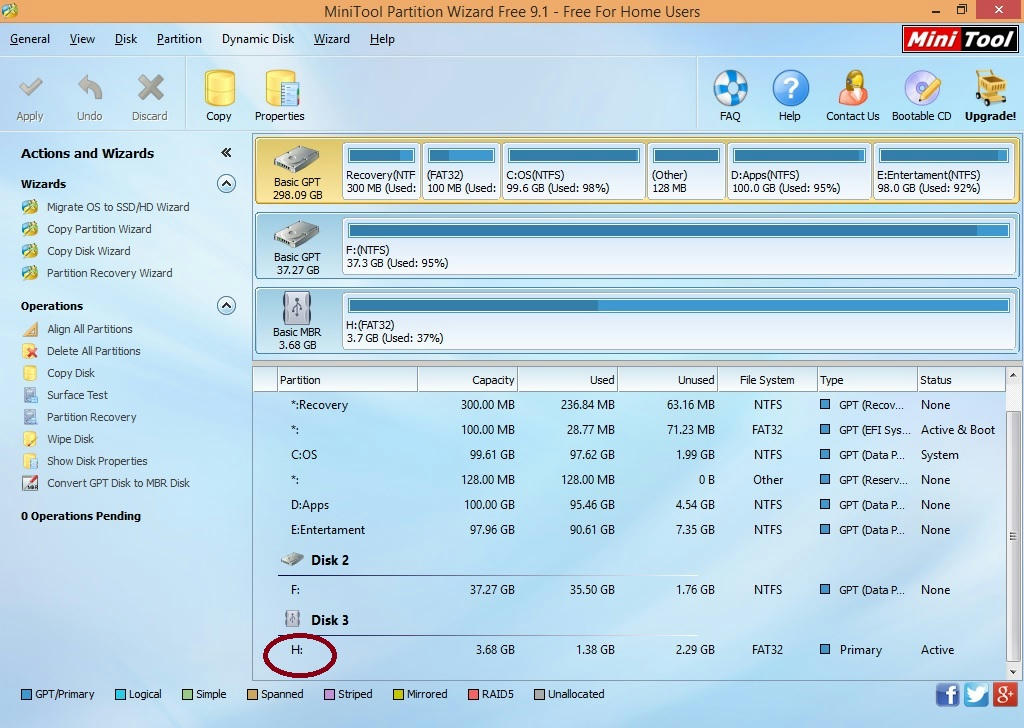
1. First you need to download a Partition Wizard Manager. Download the one you like.
  1. mini Partition Wizard Manager Free
  2. EASEUS Partition Master 9.1.0 Home Edition

2. Connect your memory card to the computer with a card reader

3. Make a backup of the data on your SD card.

4. Now install the downloaded tool and open the memory card

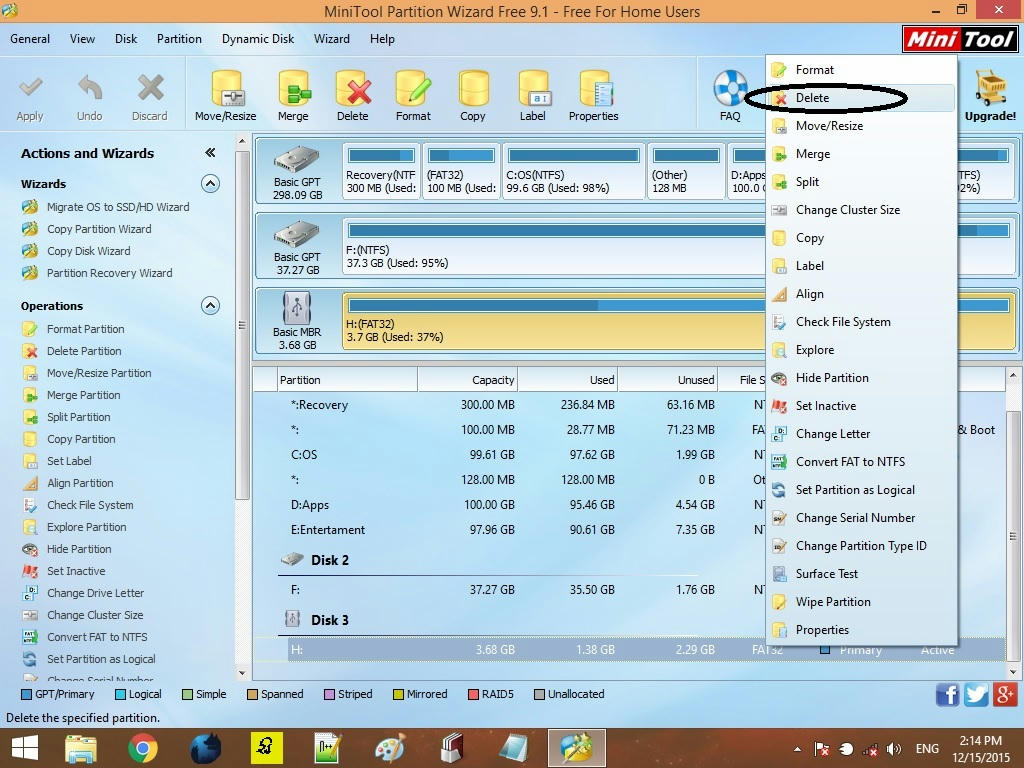
5. Now right-click where your memory card is displayed and give the option "delete".


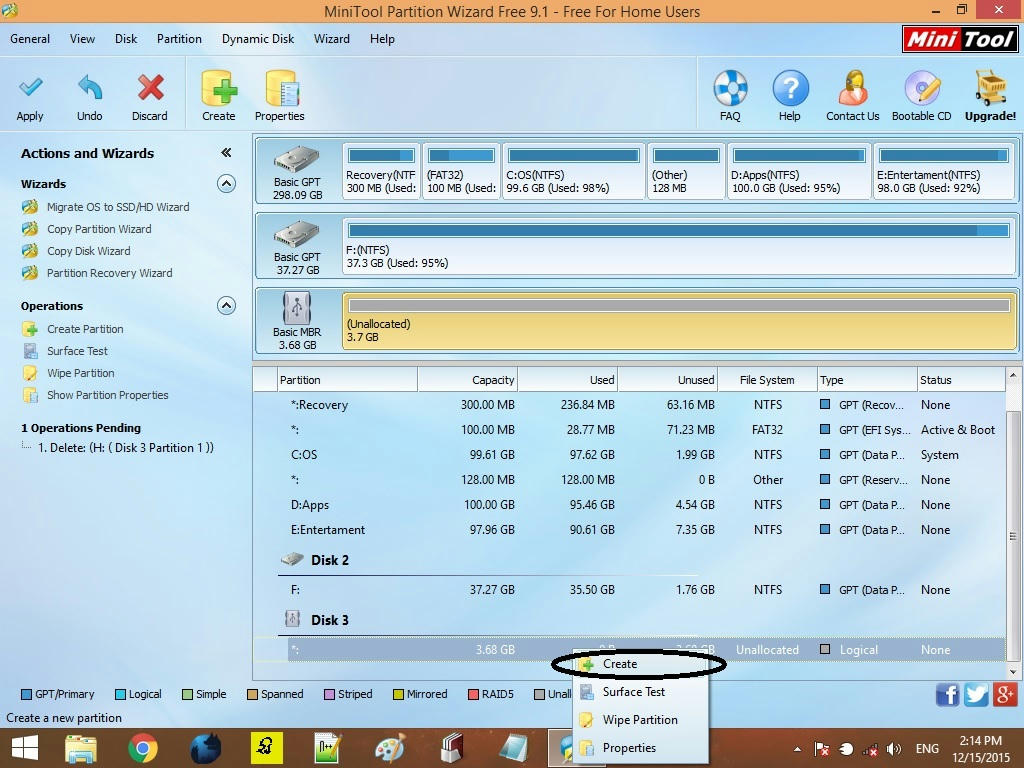
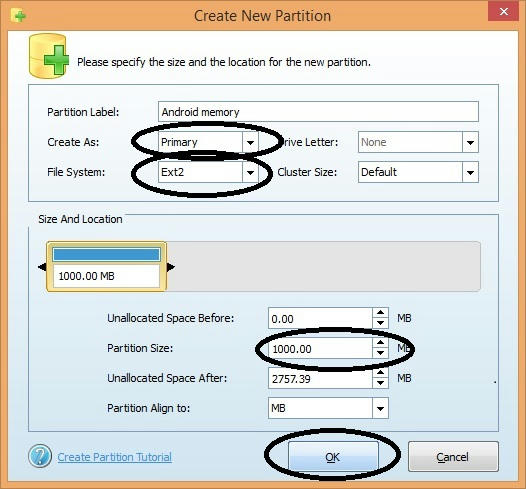
6. Right-click again and give the 'Create New' option. Creating a partition with "FAT32" is the only way to know the data like your song films.


7. Then do one "Create as Primary".


8. Then go to the previous one and give the desired memory to your phone memory as ext2 / ext3 / ext4 as one of these. Give ext2 to anybody because most phones support this.

9. Give it a “Create as the primary” (both the partitions we created must be primary or this will not work).


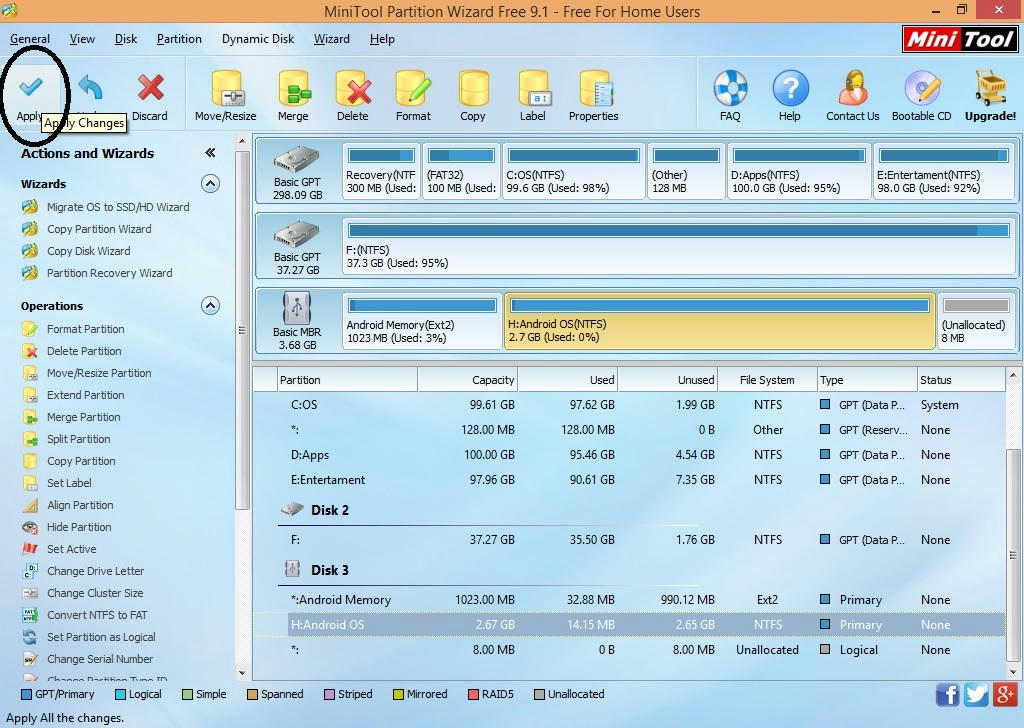
10. Now work or then give you're "apply" and then work right now 2 partitions have been created. Remember, you are now shown only the partition that was previously made of "FAT32".


Right now the first way is over

2nd method
In this case, you need to have ClockwordMod installed on your phone or you can not do this without your phone. If you have CWM, you can choose the one you like and work with it. I do not know the name of this. I do not know what to do with it. I do not know what to do with it.

You really need to have a custom ROM installed on your phone for this. I suggest you use the first method.

Let's see how to use Link2SD

1. You have now partitioned the memory card, then download this app now
 Link2SD (You also need to have your phone rooted for this)

2. Now insert the memory card into the phone and open the app

3. Then the box will ask you what is the format of your second partition and give it the ext2 / ext3 / ext4 you gave earlier. If you gave ext2, select one.


Then it says Mount Script Created and then reboot your phone. Then open the app again and if no message comes then it will work. Then you can click on the apps that you have on your phone and tick the ones at the bottom of the menu (app, Dalvik-cache, and library files). You can not put a tik together. You have to pay for that app together.

4. Then type "create a link".

5. Now look at the Storage Info and then you can see your storage info. Send it to your previous memory and the new one.

6 . Okay now you know as much as you can about the newly created part of the app.


So today is the end of the article. Don't forget to like, comment and share...

Share:

Wednesday, December 16, 2015

How to root my android phone


One of the questions most people who buy a new Android phone ask is "Should I root the phone or not".

Most Android phones have basic settings that the user can use with some restrictions. That means we can't do a lot of things related to the system. Rooting will cause you to lose all of these boundaries. That means we can add a lot of new work to our Android system.

Is it dangerous to root the phone?

I was too scared to root at first. But somehow finally rooted. Many people are afraid that their phones will be broken. But it is much less likely to break during rooting

Why root the phone?

Simply put, you can take full control of the phone. (I wanted to put Sinhala. I want to increase my memory.)

Advantages of rooting

1. Rooting removes the limitations of using an Android OS.

2. You can install unofficial Android versions (custom ROM). Some phones do not receive official updates on the latest versions of Android. You can then install a new version using a custom ROM. The phone must be rooted for this.

3. Some phones need to be rooted to take screenshots.

4. Ability to use Sinhala language. (For me, this is the biggest advantage).

5. Apps are installed on the phone's internal memory. You can install these apps on the SD card by rooting. (For me, this is the second biggest advantage).

6. The processor can be over-locked / under-locked.

 7. In addition, there are many other benefits. 

Disadvantages

1. Rooting some phones will not be able to make an official update.

2. Rooting can slow down the phone.

3. If rooting is not done properly, the phone may be Unusual things can happen.


Finally, I have to say. Rooting will void the warranty of the phone, and if you are new to Android, this is a bit risky. Therefore, rooting should be done very carefully. There are different ways to root each phone. And you can unroot it if you like.

Okay now let's see how to do it
  1. Go Here here and get that APP.
  2.  Install the app.
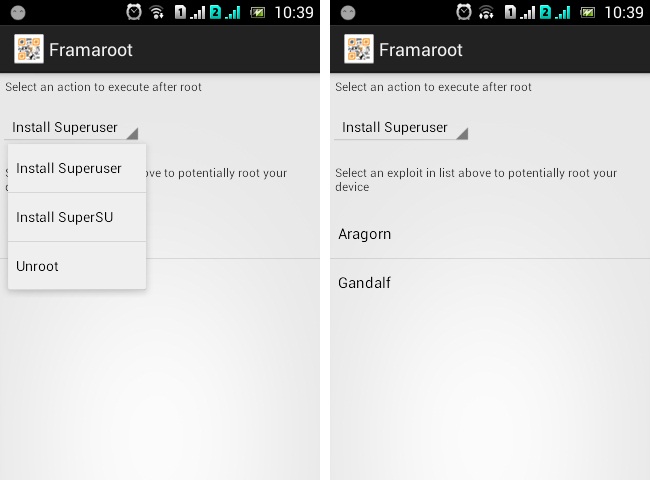
  3.  Then in the menu that appears, give the root.

Give install superSU first and then Gandalf.

All right, now reboot your phone. Then see if there is a superSU in your apps that is rooted.


So today is the end of the article. Don't forget to like, comment and share...


Share:

Monday, December 14, 2015

Shall we learn Java?

There are many people who love to learn Java, I brought this to them. I wanted to publish this in parts, but these days I'm going to give it a pdf because my net connection is going down. Now let's see what Java is,

Java is currently the most popular programming program in the world. Java is the most widely used programming language for creating beautiful web pages, writing various programs for smartphones and PDA devices. Even a person with no basic knowledge of the Java programming language can learn through this series of lessons. This tutorial also includes tips for those who are currently working in Java.

Click this image to download
http://www.mediafire.com/download/pz95mqhtfuc7583/EasyGuide+Java+Sinhala+E-Book+by+Maradan+kadawala+yakadaya.pdf


Ah, I put this in our forum, I thought I could not edit it again, so I put it like that.


So today is the end of the article. Don't forget to like, comment and share...

Share:
Always be courteous to contact us If you want any help.